
Jul 8, 2026
Overcoming Heat Haze and Thermal Noise: Zenmuse H30T Tactics for Summer Inspections
Missing a critical ten-degree delta on a high-voltage substation connector because the ambient concrete is radiating forty degrees of heat is an expensive day out. When the UK grid bakes under a summer heatwave thermal data degradation happens long before your equipment hits its built-in hardware limits. Shimmering air columns and thermal sensor saturation can quietly turn high-resolution data into useless imagery.
Enterprise inspection schedules cannot simply pause because the British summer finally decides to show up. Managing these heatwave conditions requires a solid understanding of how extreme thermal environments affect uncooled microbolometer sensors. It also demands a practical approach to handling fleet hardware when the ground environment is working against you.
The Physics of Summer Sensor Saturation
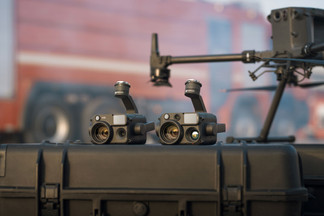
Background radiation is the primary enemy of data accuracy during a summer inspection. The Zenmuse H30T features a high-resolution thermal sensor that captures subtle raw temperature data. However, high ambient temperatures reduce the relative contrast between a failing industrial asset and the surrounding air. When a concrete pad or metal crossarm is heat-soaked to forty degrees finding a localized anomaly requires perfect sensor configuration.
Optical turbulence creates a secondary layer of data distortion known as heat haze. Rising hot air shifts the refractive index of the atmosphere between your payload and the target asset. This refraction causes pixel jitter and blurs the sharp edges of your imagery. No amount of digital stabilization or gimbal tuning can correct this physical distortion of the light path.
The internal temperature of the uncooled vanadium oxide sensor sensor grid will fluctuate during a prolonged mid-day hover. As the camera housing absorbs direct solar radiation the baseline calibration drifts. This drift manifests as thermal noise or fixed-pattern ghosting across your live video feed. Frequent adjustments to your collection parameters are required to maintain clear target identification.
Exploring the environmental tolerances of the newest generation of industrial inspection sensors is simple when you check the available payload setups at the
. Dronedesk Shop
Adjusting Flight Profiles to Beat the Shimmer
Air density drops significantly as ambient temperatures climb during a heatwave. This change directly impacts the lift efficiency of your propellers forcing your aircraft motors to draw more current to maintain altitude. Your expected flight window on a set of packs will shrink long before you receive a high-temperature threshold alert on your controller. Planning for wider contingency margins is a necessary step during summer mission profiling.
-
Standard DJI battery operating ceiling: 40°C ambient enviroment
- Heatwave lift efficiency drop: Approx 10% reduction in thin hot air
- High-gain thermal range restriction: -20° to 150° maximum envelope
Modifying your camera angle relative to the ground plane minimizes the intake of background solar reflections. Shooting directly down onto metallic structures or concrete infrastructure introduces massive amounts of reflected heat signatures. Angles between thirty and forty-five degrees off nadir help isolate the target component from the surrounding radiation footprint. This angle separation preserves your measurement accuracy when tracking delicate asset components.
Varying your operational altitude can help bypass the worst layers of optical shimmer. The most intense light refraction occurs in the first twenty metres above hot asphalt or dry soil. Raising your flight ceiling slightly can clear this turbulent boundary layer. The long-range capabilities of the visual zoom system can then offset the increased distance without sacrificing clear defect documentation.
Managing the Tailgate Battery Trap
Numb fingers on a freezing winter site are simply replaced by sweating over a boiling smart battery station in high summer. Charging a pair of high-capacity packs immediately after a flight will trigger a temperature protection block on the charging hub. Internal cell temperatures frequently hover near fifty degrees after a strenuous industrial mapping sequence. Forcing a charge onto a hot pack causes permanent damage to the lithium-polymer layers.
Field logistics must adapt to handle this thermal lag. Leaving your charging station enclosed in the back of a hot van is a reliable way to cause an expensive system shutdown. Stations must be placed in shaded well-ventilated positions away from direct ground dust. Crew rotation planning needs to account for longer battery cooling cycles rather than rapid back-to-back flights.
Post-flight administration quickly becomes a disorganized mess when managing multiple hot sites. Keeping track of individual battery cycle counts and identifying which packs are running hot requires formal documentation. Manually entering these statistics into a paper logbook at the end of a long field day leads to missed entries and skipped compliance checks.
FFC Calibration and Gain Setting Strategy
Flat Field Calibration runs automatically on the thermal module but the system can be caught out by rapid heat swings. Triggering a manual calibration right before entering a critical data collection line ensures the sensor baseline is clean. This manual reset clears the pixel non-uniformity that accumulates when moving from shaded staging areas into intense unshaded sunlight.
High-gain mode delivers optimal resolution across a restricted temperature window. This mode is suitable for identifying insulation breakdowns or localized resistance issues on standard distribution lines. If the background concrete structures exceed fifty degrees the live feed can saturate completely. Switching to low-gain mode widens the target window up to 550°C but reduces your ability to see subtle single-digit differentials.
The high-resolution live view mode on the newer enterprise software improves target clarity during active search missions. This configuration helps you identify fine physical structures through the atmospheric distortion. Operators must remember that active temperature measurement metrics are disabled while this enhanced view mode is selected.
Building Audit-Ready Environmental Logs
Gaining approval for specialized operations under an Operational Authorisation demands clear record-keeping. The Civil Aviation Authority expects enterprise operators to document the exact parameters of each flight. If an incident occurs during a heatwave you must prove your fleet was operating within the manufacturer temperature envelopes.
Automated flight logging integration removes the risk of human error from your compliance logs. Synchronizing your controller data directly with a central operations platform captures local ambient conditions seamlessly. This data foundation creates an unalterable audit trail that protects your business from insurance liabilities.
Organizing these details inside a single system allows enterprise managers to spot hardware trends early. If a specific multi-rotor rig consistently triggers high-temperature warnings on certain airframe components it can be flagged for maintenance before a major component failure happens in the field.
To protect your business margins and ensure data accuracy during summer utility contracts you must match top-tier hardware with automated compliance workflows. Upgrade your fleet capabilities at the Dronedesk Shop and completely eliminate unbillable admin hours by tracking your flight program with Dronedesk software.